Milesight WS156: LoRaWAN E-Ink Smart Scene Panel
Milesight WS156 LoRaWAN E-Ink scene panel: 6 buttons, own ChirpStack/ThingsBoard decoder, decoded example and D2D scene control.
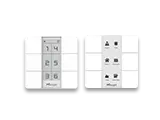
- LoRaWAN
- Class C, OTAA
- Buttons
- 6 programmable scene buttons
- Display
- E-Ink, programmable labels/icons
- Control modes
- LoRaWAN uplink or Milesight D2D per button
- Power
- Battery or USB-C
- Mounting
- Wall mount, indoor IP30
- Configuration
- NFC / Milesight ToolBox
What the WS156 measures
Button press
Reports which of the 6 scene buttons was pressed, on channel FF type 34.
D2D command
Each button carries a 16-bit D2D control word to trigger a paired Milesight device.
Battery level
Battery percentage on channel 01 type 75 (UINT8).
Device status
Join, reset and version frames on channel FF for inventory and audit.
Integration
Sensor / controller
Measures or controls in the field and sends LoRaWAN uplinks.
LoRaWAN gateway
Receives the radio packets and forwards them to the server.
ChirpStack
Network server: manages sessions and decodes the payload.
ThingsBoard / Grafana
Dashboards, alarms, rules and reports.
function decodeUplink(input) {
  var bytes = input.bytes;
  var data = {};

  for (var i = 0; i < bytes.length; ) {
    var channel = bytes[i++];
    var type = bytes[i++];

    if (channel === 0x01 && type === 0x75) {          // battery (%)
      data.battery = bytes[i]; i += 1;
    } else if (channel === 0xff && type === 0x34) {   // button press + D2D command
      var id = bytes[i];
      data["button_" + id] = 1;
      data["button_" + id + "_d2d"] = toHex16(readUInt16LE(bytes, i + 1));
      i += 3;
    } else if (channel === 0xff && type === 0x01) {   // protocol/IPSO version
      data.ipso_version = "v" + (bytes[i] >> 4) + "." + (bytes[i] & 0x0f); i += 1;
    } else if (channel === 0xff && type === 0x16) {   // serial number (8 bytes)
      data.sn = toHexStr(bytes, i, 8); i += 8;
    } else if (channel === 0xff && type === 0x0f) {   // LoRaWAN class
      data.lorawan_class = ["A", "B", "C", "CtoB"][bytes[i]] || "unknown"; i += 1;
    } else if (channel === 0xff && (type === 0x09 || type === 0x0a)) { // hw/fw version
      i += 2;
    } else if (channel === 0xff && (type === 0xfe || type === 0x0b)) { // reset / device status
      i += 1;
    } else {
      break;
    }
  }
  return { data: data };
}

function readUInt16LE(b, i) {
  return ((b[i + 1] << 8) | b[i]) & 0xffff;
}
function toHex16(v) {
  return "0x" + ("0000" + v.toString(16)).slice(-4);
}
function toHexStr(b, i, len) {
  var s = "";
  for (var k = 0; k < len; k++) s += ("0" + (b[i + k] & 0xff).toString(16)).slice(-2);
  return s;
}
Implemented from the published Milesight byte specification (Communication Protocol / User Guide).
Channel format: 01 75 battery (UINT8 %), FF 34 button press (1 byte button id + UINT16 little-endian D2D control word). Device-info frames on channel FF (version 01/09/0A, serial 16, class 0F, reset FE, status 0B) appear after a join or power-on and are skipped by length. Because each button can be set to LoRaWAN or Milesight D2D mode, a button in D2D mode triggers the paired device directly and may not produce a normal uplink. For ThingsBoard the same channel logic goes into an uplink converter. Implemented from the published Milesight byte specification.
Uplink (hex)
017564FF3401C800Decoded JSON
{ "battery": 100, "button_1": 1, "button_1_d2d": "0x00c8" }Configuration & pitfalls
Class C power budget
As a Class C device the WS156 keeps a receive window open, so battery life is shorter than a Class A sensor. Use USB-C power for always-on panels.
Per-button mode
Each of the 6 buttons is set to LoRaWAN or Milesight D2D independently. D2D buttons act locally and may not raise a server uplink, plan monitoring accordingly.
E-Ink labels
The E-Ink screen is programmed over NFC with the ToolBox. Keep label text and the scene mapping in your dashboard in sync.
D2D pairing
D2D uses a 16-bit control word and a shared frequency/key. Document each button-to-device pairing so scenes stay traceable.
How merkaio supports your WS156
From sourcing to day-to-day operation, all from one partner on our own European infrastructure.
Pre-staging & provisioning
We configure the WS156, set keys, intervals and alarms, and ship it ready to deploy.
Own decoder
Payload codec for ChirpStack v4 and ThingsBoard, implemented from the Milesight specification.
Dashboard integration
Data lands in your ThingsBoard or Grafana, with alarms and reports.
Operations & monitoring
We run the LoRaWAN stack and dashboards on European infrastructure, you just use the data.
Frequently asked questions
Let's discuss your infrastructure. Digital and on-site.
Whether it's IoT platform development, hardware selection, managed hosting for ChirpStack, ThingsBoard, Grafana or NetBird VPN, or migration from a self-hosted setup - we'll find the right solution for your use case. Book a free 30-minute consultation, no commitment required.

Your contact
Timo Wevelsiep
Founder, merkaio
15 minutes, no commitment, directly with Timo.
Decoder for ChirpStack v4. merkaio is an independent integrator and is not affiliated with Milesight.