Milesight WS513: LoRaWAN Smart Wall Socket & Energy Monitor
Milesight WS513 LoRaWAN smart wall socket: own ChirpStack/ThingsBoard decoder, voltage/power/energy example, remote on-off downlinks and overload protection.
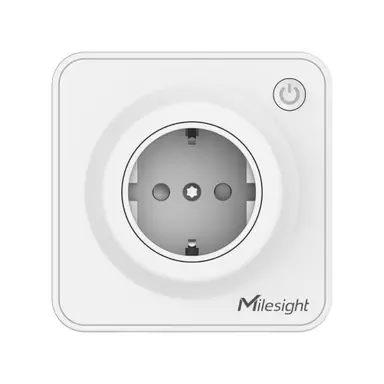
- LoRaWAN
- Class C, OTAA
- Rated load
- 16 A / 250 V AC
- Metering
- Voltage, current, power, power factor, energy
- Protection
- Overload cut-off at 130 % of rated current
- Local control
- Physical button, child lock, LED indicator
- Configuration
- NFC (Milesight ToolBox)
- Mounting
- Flush / in-wall socket (region-specific faceplate)
What the WS513 measures
Active power
Instantaneous load in watts (UINT32), updated each reporting cycle.
Power consumption
Cumulative energy in watt-hours (UINT32), resettable by downlink.
Voltage & current
Line voltage (V, /10) and load current (mA) for the connected appliance.
Power factor
Reported as a percentage (0 to 100 %).
Socket state & temperature
On/off relay state plus internal temperature for overheating detection.
Integration
Sensor / controller
Measures or controls in the field and sends LoRaWAN uplinks.
LoRaWAN gateway
Receives the radio packets and forwards them to the server.
ChirpStack
Network server: manages sessions and decodes the payload.
ThingsBoard / Grafana
Dashboards, alarms, rules and reports.
function decodeUplink(input) {
  var bytes = input.bytes;
  var data = {};

  for (var i = 0; i < bytes.length; ) {
    var channel = bytes[i++];
    var type = bytes[i++];

    if (channel === 0x03 && type === 0x74) {          // voltage (V)
      data.voltage = readUInt16LE(bytes, i) / 10; i += 2;
    } else if (channel === 0x04 && type === 0x80) {   // active power (W)
      data.active_power = readUInt32LE(bytes, i); i += 4;
    } else if (channel === 0x05 && type === 0x81) {   // power factor (%)
      data.power_factor = bytes[i]; i += 1;
    } else if (channel === 0x06 && type === 0x83) {   // power consumption (Wh)
      data.power_consumption = readUInt32LE(bytes, i); i += 4;
    } else if (channel === 0x07 && type === 0xc9) {   // current (mA)
      data.current = readUInt16LE(bytes, i); i += 2;
    } else if (channel === 0x08 && type === 0x70) {   // socket state
      data.socket_status = bytes[i] === 1 ? "on" : "off"; i += 1;
    } else if (channel === 0x09 && type === 0x67) {   // temperature (°C)
      var t = readUInt16LE(bytes, i);
      if (t === 0xfffd) data.temperature_status = "over range";
      else if (t === 0xffff) data.temperature_status = "read failed";
      else data.temperature = readInt16LE(bytes, i) / 10;
      i += 2;
    } else {
      break;
    }
  }
  return { data: data };
}

function readUInt16LE(b, i) {
  return ((b[i + 1] << 8) | b[i]) & 0xffff;
}
function readInt16LE(b, i) {
  var v = readUInt16LE(b, i);
  return v > 0x7fff ? v - 0x10000 : v;
}
function readUInt32LE(b, i) {
  return ((b[i+3]<<24)|(b[i+2]<<16)|(b[i+1]<<8)|b[i]) >>> 0;
}
Implemented from the published Milesight byte specification (Communication Protocol / User Guide).
Channel format: 03 74 voltage (UINT16LE, /10), 04 80 active power (UINT32LE, W), 05 81 power factor (%), 06 83 power consumption (UINT32LE, Wh), 07 C9 current (mA), 08 70 socket state (0 off / 1 on), 09 67 temperature (INT16LE, /10; 0xFFFD over range, 0xFFFF read failed). The 0xFF channel carries device info on join and 0xFE/0xFF downlink acknowledgements (report interval, alarms, reset energy), which the loop ignores. This decoder is implemented from the published Milesight byte specification. As a Class C device the WS513 accepts downlinks to switch the socket and reset the energy counter.
Uplink (hex)
0374FC0804809600000005816206830C00000007C98C0208700109670F00Decoded JSON
{ "voltage": 230, "active_power": 150, "power_factor": 98, "power_consumption": 12, "current": 652, "socket_status": "on", "temperature": 1.5 }Use cases
Smart office plug load
Meter and remotely switch desk and kitchen appliances to cut standby load.
MoreRetail & signage control
Schedule displays and lighting, measure per-outlet energy use.
MoreAppliance fail-safe
Overload cut-off and temperature alarms protect against overheating circuits.
Configuration & pitfalls
Class C power budget
The WS513 is mains-powered and runs Class C, so it keeps a receive window open for near-real-time on/off downlinks. No battery planning needed.
Overload protection
The socket trips at roughly 130 % of rated current. Configure the over-current threshold over NFC and surface trip events in the dashboard.
Energy counter reset
Cumulative power consumption only resets via downlink (channel 0xFE, type 0x27). Document resets so billing or sub-metering stays traceable.
Child lock & LED
Child lock and the LED indicator are toggled by downlink or NFC. Keep their state in your dashboard so operators are not surprised by a locked socket.
How merkaio supports your WS513
From sourcing to day-to-day operation, all from one partner on our own European infrastructure.
Pre-staging & provisioning
We configure the WS513, set keys, intervals and alarms, and ship it ready to deploy.
Own decoder
Payload codec for ChirpStack v4 and ThingsBoard, implemented from the Milesight specification.
Dashboard integration
Data lands in your ThingsBoard or Grafana, with alarms and reports.
Operations & monitoring
We run the LoRaWAN stack and dashboards on European infrastructure, you just use the data.
Frequently asked questions
Let's discuss your infrastructure. Digital and on-site.
Whether it's IoT platform development, hardware selection, managed hosting for ChirpStack, ThingsBoard, Grafana or NetBird VPN, or migration from a self-hosted setup - we'll find the right solution for your use case. Book a free 30-minute consultation, no commitment required.

Your contact
Timo Wevelsiep
Founder, merkaio
15 minutes, no commitment, directly with Timo.
Decoder for ChirpStack v4. merkaio is an independent integrator and is not affiliated with Milesight.