Milesight WT102: LoRaWAN Radiator Thermostat (Smart TRV)
Milesight WT102 LoRaWAN radiator thermostat: own ChirpStack decoder framework, decoded example and target-temperature downlinks for smart offices.
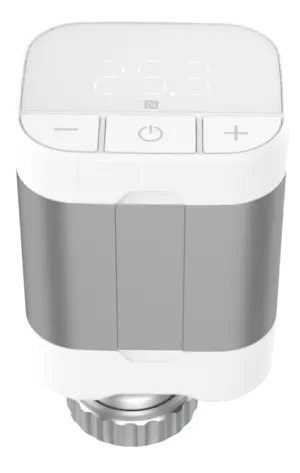
- LoRaWAN
- Class A, OTAA
- Band / port
- EU868 / port 85
- Mounting
- M30 x 1.5 valve thread (adapters incl.)
- Temperature range
- -20 to +60 °C (NTC)
- Target temperature
- 5 to 35 °C, 0.5 °C steps
- Power
- 2x AA batteries
- Configuration
- NFC (Milesight ToolBox)
What the WT102 measures
Ambient temperature
Internal NTC, -20 to +60 °C, reported with each heating-period uplink.
Current valve opening
Actual valve position 0 to 100 % from the motor.
Target temperature
The setpoint the device is regulating to, 5 to 35 °C.
Target valve opening
Setpoint for valve-opening control mode, 0 to 100 %.
Battery level
Reported in periodic uplinks, with low-battery alarm event.
Integration
Sensor / controller
Measures or controls in the field and sends LoRaWAN uplinks.
LoRaWAN gateway
Receives the radio packets and forwards them to the server.
ChirpStack
Network server: manages sessions and decodes the payload.
ThingsBoard / Grafana
Dashboards, alarms, rules and reports.
function decodeUplink(input) {
  var bytes = input.bytes;
  var data = {};

  for (var i = 0; i < bytes.length; ) {
    var channel = bytes[i++];

    if (channel === 0x00) {            // battery (%)
      data.battery = bytes[i]; i += 1;
    } else if (channel === 0x01) {     // ambient temperature (INT16 LE, /100)
      data.temperature = readInt16LE(bytes, i) / 100; i += 2;
    } else if (channel === 0x02) {     // motor total stroke
      data.motor_total_stroke = readUInt16LE(bytes, i); i += 2;
    } else if (channel === 0x03) {     // motor position
      data.motor_position = readUInt16LE(bytes, i); i += 2;
    } else if (channel === 0x04) {     // current valve opening (%)
      data.valve_opening = bytes[i]; i += 1;
    } else if (channel === 0x06) {     // target temperature (INT16 LE, /100)
      data.target_temperature = readInt16LE(bytes, i) / 100; i += 2;
    } else if (channel === 0x07) {     // target valve opening (%)
      data.target_valve_opening = bytes[i]; i += 1;
    } else if (channel === 0x08) {     // low-battery alarm: battery (%)
      data.low_battery_alarm = true; data.battery = bytes[i]; i += 1;
    } else {
      // calibration (0x05), event/alarm and periodic-report frames
      // (0x09..0x0E, 0x60.., 0xFF..) are configuration-dependent:
      // decode per deployment, see note
      break;
    }
  }
  return { data: data };
}

function readUInt16LE(b, i) {
  return (b[i + 1] << 8) | b[i];
}
function readInt16LE(b, i) {
  var v = readUInt16LE(b, i);
  return v > 0x7fff ? v - 0x10000 : v;
}
Implemented from the published Milesight byte specification (Communication Protocol / User Guide).
Implemented from the published Milesight byte specification. Unlike the IPSO sensors, the WT102 uses a command-ID payload: each frame starts with a command byte, no separate type byte. The basic data channels are 0x00 battery (%), 0x01 ambient temperature (INT16 LE, /100), 0x04 current valve opening (%), 0x06 target temperature (INT16 LE, /100), 0x07 target valve opening (%). The periodic-report frame (0x0E) and the event/alarm frames carry a variable structure that depends on the configured control mode (automatic temperature, valve opening or integrated), so that part is a framework we build out per deployment. As a Class A device the WT102 accepts downlinks in its receive windows to set the target temperature or valve opening.
Uplink (hex)
0064016608040606f6090707Decoded JSON
{ "battery": 100, "temperature": 21.5, "valve_opening": 6, "target_temperature": 25.5, "target_valve_opening": 7 }Configuration & pitfalls
NFC setup
Keys, control mode, heating period and schedules are set over NFC with the Milesight ToolBox before mounting on the valve.
Motor calibration
After mounting, the device calibrates the motor stroke against the valve. Watch the calibration result event; a failed calibration means no temperature control.
Heating vs non-heating period
The reporting interval and valve behaviour differ between the configured heating season and the off-season. Plan dashboard expectations for both.
Control mode drives the payload
Automatic temperature, valve-opening and integrated control produce different periodic-report layouts, so finalise the decoder against the mode you deploy.
How merkaio supports your WT102
From sourcing to day-to-day operation, all from one partner on our own European infrastructure.
Pre-staging & provisioning
We configure the WT102, set keys, intervals and alarms, and ship it ready to deploy.
Own decoder
Payload codec for ChirpStack v4 and ThingsBoard, implemented from the Milesight specification.
Dashboard integration
Data lands in your ThingsBoard or Grafana, with alarms and reports.
Operations & monitoring
We run the LoRaWAN stack and dashboards on European infrastructure, you just use the data.
Frequently asked questions
Let's discuss your infrastructure. Digital and on-site.
Whether it's IoT platform development, hardware selection, managed hosting for ChirpStack, ThingsBoard, Grafana or NetBird VPN, or migration from a self-hosted setup - we'll find the right solution for your use case. Book a free 30-minute consultation, no commitment required.

Your contact
Timo Wevelsiep
Founder, merkaio
15 minutes, no commitment, directly with Timo.
Decoder for ChirpStack v4. merkaio is an independent integrator and is not affiliated with Milesight.