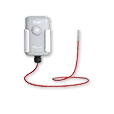
Milesight EM500-PT100: LoRaWAN Industrial Temperature Sensor
Milesight EM500-PT100 LoRaWAN PT100 industrial temperature sensor: own ChirpStack/ThingsBoard decoder, decoded example and mutation alarms.
- LoRaWAN
- Class A, OTAA
- Band / port
- EU868 / port 85
- Probe
- PT100 platinum RTD
- Temperature
- -50 to +800 °C (custom -200 to +800 °C)
- Accuracy / resolution
- ±0.5 °C / 0.1 °C
- Ingress protection
- IP67
- Battery
- Replaceable 19000 mAh, up to 10 years
What the EM500-PT100 measures
Temperature
PT100 platinum RTD, -50 to +800 °C, INT16 raw value divided by 10.
Threshold and mutation alarms
When a configured limit or a sudden jump is exceeded, the device reports the current value, the change against the previous sample and an alarm type (threshold alarm, threshold alarm release or mutation alarm).
Battery level
Reported periodically as a percentage, with local history storage and retransmission.
Integration
Sensor / controller
Measures or controls in the field and sends LoRaWAN uplinks.
LoRaWAN gateway
Receives the radio packets and forwards them to the server.
ChirpStack
Network server: manages sessions and decodes the payload.
ThingsBoard / Grafana
Dashboards, alarms, rules and reports.
function decodeUplink(input) {
  var bytes = input.bytes;
  var data = {};

  for (var i = 0; i < bytes.length; ) {
    var channel = bytes[i++];
    var type = bytes[i++];

    if (channel === 0x01 && type === 0x75) {          // battery (%)
      data.battery = bytes[i]; i += 1;
    } else if (channel === 0x03 && type === 0x67) {   // temperature (°C)
      data.temperature = readInt16LE(bytes, i) / 10; i += 2;
    } else if (channel === 0x83 && type === 0xd7) {   // temperature + alarm
      data.temperature = readInt16LE(bytes, i) / 10;
      data.temperature_mutation = readInt16LE(bytes, i + 2) / 10;
      data.temperature_alarm = readAlarm(bytes[i + 4]);
      i += 5;
    } else {
      break;
    }
  }
  return { data: data };
}

function readInt16LE(b, i) {
  var v = (b[i + 1] << 8) | b[i];
  return v > 0x7fff ? v - 0x10000 : v;
}

function readAlarm(b) {
  var map = { 0: "threshold alarm", 1: "threshold alarm release", 2: "mutation alarm" };
  return map[b] !== undefined ? map[b] : "unknown";
}
Implemented from the published Milesight byte specification (Communication Protocol / User Guide).
Channel format: 01 75 battery (%), 03 67 temperature (INT16 little-endian, /10 °C), 83 d7 temperature plus alarm. The alarm frame carries the current value, the change against the previous sample and an alarm-type byte: 0 threshold alarm, 1 threshold alarm release, 2 mutation alarm. Device-info segments on channel FF (version, serial number, class) appear on join and power-on and are skipped here. For ThingsBoard the same channel logic goes into an uplink converter.
Uplink (hex)
0175640367E803Decoded JSON
{ "battery": 100, "temperature": 100 }Use cases
Process & machine monitoring
Track furnace, motor, bearing and pipe temperatures across harsh plant environments.
MoreCold-chain & freezer monitoring
Wide-range probe placement for deep-freeze stores and HACCP logs with alarms.
MoreSmart agriculture
Soil, silo and greenhouse temperature points connected over LoRaWAN.
MoreConfiguration & pitfalls
NFC setup
Keys, reporting interval, temperature range and mutation alarm are set over NFC with the Milesight ToolBox before rollout.
Probe range vs. resolution
The default range is -50 to +800 °C; configure a narrower custom range where your process allows it so threshold rules stay meaningful.
Threshold and mutation alarms
The 83 d7 frame reports a threshold breach or a sudden temperature jump immediately, outside the reporting interval, and carries an alarm type byte (0 threshold alarm, 1 release, 2 mutation). Dashboard rules should treat these uplinks as priority events.
Probe placement & thermal lag
RTD response depends on contact and immersion depth; document the mounting so readings stay traceable and account for lag when alerting on fast transitions.
How merkaio supports your EM500-PT100
From sourcing to day-to-day operation, all from one partner on our own European infrastructure.
Pre-staging & provisioning
We configure the EM500-PT100, set keys, intervals and alarms, and ship it ready to deploy.
Own decoder
Payload codec for ChirpStack v4 and ThingsBoard, implemented from the Milesight specification.
Dashboard integration
Data lands in your ThingsBoard or Grafana, with alarms and reports.
Operations & monitoring
We run the LoRaWAN stack and dashboards on European infrastructure, you just use the data.
Frequently asked questions
Let's discuss your infrastructure. Digital and on-site.
Whether it's IoT platform development, hardware selection, managed hosting for ChirpStack, ThingsBoard, Grafana or NetBird VPN, or migration from a self-hosted setup - we'll find the right solution for your use case. Book a free 30-minute consultation, no commitment required.

Your contact
Timo Wevelsiep
Founder, merkaio
15 minutes, no commitment, directly with Timo.
Decoder for ChirpStack v4. merkaio is an independent integrator and is not affiliated with Milesight.