Milesight AM104: 4-in-1 LoRaWAN Indoor Ambience Sensor
Milesight AM104 4-in-1 LoRaWAN sensor: temperature, humidity, motion and light with own ChirpStack/ThingsBoard decoder and decoded example.
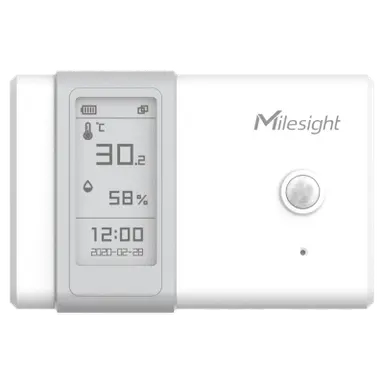
- LoRaWAN
- Class A, OTAA
- Band / port
- EU868 / port 85
- Measurements
- 4-in-1: temperature, humidity, motion, light
- Temperature
- 0 to +50 °C indoor
- Humidity
- 0 to 100 % RH
- Power
- 2x AA batteries, more than one year
- Configuration
- NFC (Milesight ToolBox)
What the AM104 measures
Temperature
Indoor air temperature, INT16 little-endian scaled by 10.
Humidity
Relative humidity 0 to 100 % RH, reported in 0.5 % steps.
Motion (PIR)
Passive infrared occupancy activity counter per reporting window.
Light
Illumination in lux plus visible and infrared raw channels.
Battery level
Reported as a percentage so you can plan AA replacement.
Integration
Sensor / controller
Measures or controls in the field and sends LoRaWAN uplinks.
LoRaWAN gateway
Receives the radio packets and forwards them to the server.
ChirpStack
Network server: manages sessions and decodes the payload.
ThingsBoard / Grafana
Dashboards, alarms, rules and reports.
function decodeUplink(input) {
  var bytes = input.bytes;
  var data = {};

  for (var i = 0; i < bytes.length; ) {
    var channel = bytes[i++];
    var type = bytes[i++];

    if (channel === 0x01 && type === 0x75) {          // battery (%)
      data.battery = bytes[i]; i += 1;
    } else if (channel === 0x03 && type === 0x67) {   // temperature (°C)
      data.temperature = readInt16LE(bytes, i) / 10; i += 2;
    } else if (channel === 0x04 && type === 0x68) {   // humidity (%RH)
      data.humidity = bytes[i] / 2; i += 1;
    } else if (channel === 0x05 && type === 0x6a) {   // PIR activity counter
      data.activity = readUInt16LE(bytes, i); i += 2;
    } else if (channel === 0x06 && type === 0x65) {   // light: lux + visible/IR + IR
      data.illumination = readUInt16LE(bytes, i);
      data.infrared_and_visible = readUInt16LE(bytes, i + 2);
      data.infrared = readUInt16LE(bytes, i + 4);
      i += 6;
    } else {
      break;
    }
  }
  return { data: data };
}

function readUInt16LE(b, i) {
  return (b[i + 1] << 8) | b[i];
}
function readInt16LE(b, i) {
  var v = readUInt16LE(b, i);
  return v > 0x7fff ? v - 0x10000 : v;
}
Implemented from the published Milesight byte specification (Communication Protocol / User Guide).
Channel format: 01 75 battery (%), 03 67 temperature (INT16 little-endian, /10), 04 68 humidity (/2), 05 6A motion activity (UINT16 little-endian), 06 65 light (illumination lux, visible+infrared, infrared as three UINT16 little-endian values). Device-info and downlink-response frames on channel 0xFF/0xFE carry no measurement data and can be ignored. For ThingsBoard the same channel logic goes into an uplink converter. Implemented from the published Milesight byte specification.
Uplink (hex)
0175640367EB00046E056A0C0006656801A0011400Decoded JSON
{ "battery": 100, "temperature": 23.5, "humidity": 55, "activity": 12, "illumination": 360, "infrared_and_visible": 416, "infrared": 20 }Use cases
Configuration & pitfalls
NFC setup
Keys, reporting interval and the PIR/light thresholds are set over NFC with the Milesight ToolBox app before rollout.
AA battery power
The AM104 runs on two replaceable AA cells. The smart hibernate schedule and reporting interval directly drive battery life, so set them realistically.
PIR placement
Passive infrared needs line of sight and is sensitive to mounting height and HVAC airflow. Position the sensor so the detection cone covers the occupied area.
No display variant
The AM104 has no E-ink screen (unlike the AM107/AM300). All values are read over LoRaWAN, so plan a dashboard rather than relying on a local readout.
How merkaio supports your AM104
From sourcing to day-to-day operation, all from one partner on our own European infrastructure.
Pre-staging & provisioning
We configure the AM104, set keys, intervals and alarms, and ship it ready to deploy.
Own decoder
Payload codec for ChirpStack v4 and ThingsBoard, implemented from the Milesight specification.
Dashboard integration
Data lands in your ThingsBoard or Grafana, with alarms and reports.
Operations & monitoring
We run the LoRaWAN stack and dashboards on European infrastructure, you just use the data.
Frequently asked questions
Let's discuss your infrastructure. Digital and on-site.
Whether it's IoT platform development, hardware selection, managed hosting for ChirpStack, ThingsBoard, Grafana or NetBird VPN, or migration from a self-hosted setup - we'll find the right solution for your use case. Book a free 30-minute consultation, no commitment required.

Your contact
Timo Wevelsiep
Founder, merkaio
15 minutes, no commitment, directly with Timo.
Decoder for ChirpStack v4. merkaio is an independent integrator and is not affiliated with Milesight.